
We are reader supported. When you purchase through links on our site, we may earn an affiliate commission. Also, as an Amazon affiliate, we earn from qualifying purchases.
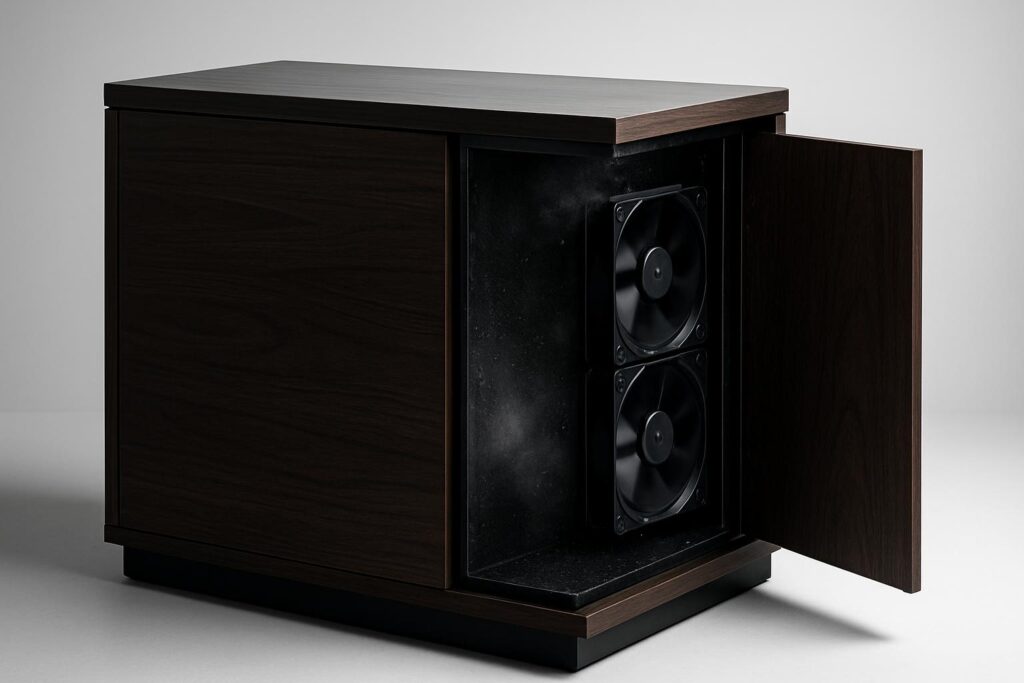
Humidity trapped inside an aquarium stand is a slow and avoidable problem. Sump evaporation, warm equipment, and poor air exchange raise relative humidity. That moisture then swells wood, rusts hardware, fogs doors, and shortens the life of power supplies and controllers. The fix is simple and low cost: move air through the cabinet with quiet, reliable fans. In 2026, there are mature cabinet fan systems that are easy to install, safe around aquariums, and smart enough to run only when needed. This guide breaks down how they help, what to look for, and six excellent options you can trust.
Why cabinet humidity control matters
Even a small sump can evaporate a surprising amount of water in a day. That water vapor gets trapped inside a closed cabinet. Warm pumps and lights in the stand raise the air temperature, which increases the amount of water the air can hold. When the warm, wet air touches cooler doors or side panels, condensation forms. Over time, you will see wood swelling, peeling laminates, rusty hinges, and crusty salt creep on cables. Electronics suffer first. A gentle airflow path through the cabinet breaks this cycle.
How a cabinet cooling fan fixes the problem
A fan does two things that matter for humidity control:
- It pulls fresh, drier room air in and pushes moist air out, preventing moisture build up.
- It removes the warm boundary layer around hot equipment, lowering internal temperature and stabilizing humidity.
With steady exchange, relative humidity in the stand drops quickly. Wood stays dry, salt creep slows, and corrosion risk falls. You may also see a small drop in aquarium water temperature thanks to stronger evaporation across the sump surface. The main win is a stable, dry cabinet.
Quick picks
Each setup is different, so here is a fast orientation before the detailed reviews:
- AC Infinity AIRPLATE T8 with controller: Best all around system with smart control.
- AC Infinity MULTIFAN S3: Best simple USB fan for plug and play airflow.
- Wathai Dual 120 mm USB Panel: Best door mounted push or pull panel for high humidity stands.
- Coolerguys 120 mm USB kit: Best modular kit for custom cabinets and DIY filters.
- GDSTIME 120 mm USB fan with speed control: Best budget pick for targeted spots.
- AC Infinity AXIAL 1238 AC fan: Best permanent mount for high back pressure vents or long term builds.
Buying checklist
Match airflow to cabinet size and moisture load
Small stands with a nano sump only need a single 120 mm fan. Larger reef stands with big skimmers and refugiums do better with a push pull pair. If you see persistent condensation on doors, step up fan size or add a second exhaust.
Decide on control
Some fans include a thermal controller that starts fans when the cabinet warms up. This is convenient and keeps noise low. For the most stable humidity, you can also pair a simple fan with an external humidity controller, but that adds complexity most beginners do not need.
Power type and safety
USB powered fans are low voltage, simple, and easy to route. AC mains fans can be stronger and more durable in continuous duty. Whichever you choose, use a GFCI outlet and drip loops.
Noise and vibration
Look for ball bearing or dual ball bearing designs for long life and low noise. A speed controller is useful to dial in quiet operation once you confirm you have enough airflow.
Filters and salt protection
Cabinets shed dust and salt creep. A removable grill or filter pad on the intake side keeps fans clean. Plan to wipe grills monthly.
The 6 best aquarium cabinet cooling fans for humidity control in 2026
1) AC Infinity AIRPLATE T8 with Controller
This is a dual fan panel with a smart controller designed for cabinets. The digital controller reads temperature via a probe and runs the fans only when needed. You can set speeds and trigger points, and the system includes mounting hardware and grills. For an aquarium stand, this is a clean, finished solution that looks neat and works reliably.
Why it helps: Automatically moves air when the cabinet warms from pumps and lights, which is when humidity rises fastest. Continuous low speed is also an option for steady drying. The dual 120 mm layout moves more air across a larger opening than a single fan.
Best for: Medium to large stands that hold sumps and multiple devices. Owners who want set and forget control without separate controllers.
Standout features: Digital controller with probe, multiple speed presets, low vibration fans, protective grills, tidy wiring.
Installation notes: Mount high on a side panel or door as an exhaust and add a passive intake low on the opposite side. Keep the probe near the warmest equipment, not submerged, and away from salt spray.
Potential downsides: Requires cutting a panel opening. The controller is temperature based, not humidity based, though in practice this aligns well with humidity spikes.
2) AC Infinity MULTIFAN S3 120 mm USB Fan
This 120 mm USB powered fan is a favorite for simple cabinet ventilation. It is compact, quiet, and includes a basic speed control. Place it to blow out of a side vent or door gap, or mount it behind a grill for a cleaner look. You can also run multiple units from a powered USB hub if you want to scale up.
Why it helps: Provides consistent airflow with minimal effort. USB power makes routing clean in tight stands and keeps voltage low around moisture.
Best for: Small to medium stands, renters who want to avoid cutting large panels, and anyone who prefers low voltage equipment.
Standout features: Quiet operation, USB power, simple speed control, stackable units for more flow.
Installation notes: Angle it as an exhaust at the top of the cabinet. Create a small intake near the bottom by cracking a door or drilling a discreet vent hole. Add a dust filter on the intake side to reduce salt ingress.
Potential downsides: No advanced controller. Mounting brackets or a grill may need to be purchased separately.
3) Wathai Dual 120 mm USB Cabinet Fan Panel
This is a dual fan panel made for cabinets. It arrives as a finished assembly with two 120 mm fans, grills, and a speed controller. You can flip it to act as intake or exhaust. For aquarium stands that have persistent moisture, the larger opening and dual fan design remove humid air fast without much noise.
Why it helps: The dual fan panel covers more area, which improves exchange across the whole cabinet rather than creating a narrow jet. This is effective in stands that trap moisture under shelving or behind sump walls.
Best for: Large stands, high evaporation reef systems, and users who want a factory panel rather than piecing parts together.
Standout features: Dual 120 mm layout, USB power with speed control, reversible airflow, protective grills.
Installation notes: Mount it high as an exhaust and open a low intake on the opposite side. If the stand is very sealed, add a small louver or drill a pattern of intake holes to prevent fan strain.
Potential downsides: Not sealed for salt spray. Intake filtering is recommended; place a simple filter pad behind the grill and clean it monthly.
4) Coolerguys 120 mm USB Cooling Fan Kit
Coolerguys specializes in cabinet ventilation. Their 120 mm USB kit offers a quiet fan, protective grill, screws, and often optional accessories like filters and mounting plates depending on the bundle. It is a reliable platform for custom cabinet projects where you want to choose your own vent path and finishing hardware.
Why it helps: A balanced fan with solid bearings runs quietly for long durations, which is perfect for a sump stand that benefits from near continuous airflow.
Best for: DIY minded owners who want clean, modular parts and optional filters. Custom stands and furniture grade cabinets.
Standout features: Quality bearings, USB power, accessory ecosystem including grills and filters, easy mounting.
Installation notes: Use it as an exhaust and pair it with a simple louvered intake. If you add a filter, place it on the intake side so the fan stays clean. Verify that the USB power supply is rated to run 24 or 7 if you want continuous duty.
Potential downsides: Fewer smart control features in the basic kit. You may need a separate speed controller if not included in your chosen bundle.
5) GDSTIME 120 mm USB Fan with Speed Control
GDSTIME offers a budget friendly 120 mm USB fan that includes an inline speed controller and a protective grill. It is a straightforward way to clear humid air without changing the cabinet structure much. Many hobbyists run one as an exhaust and one as a gentle intake.
Why it helps: Moves enough air for small and mid size stands, and the adjustable speed lets you tune noise down at night while keeping airflow steady.
Best for: Budget builds, freshwater stands with moderate evaporation, and temporary cooling while planning a more permanent panel.
Standout features: Inline speed control, USB power, easy placement near vent holes or door gaps, compact size.
Installation notes: Keep cables off the cabinet floor. Create a drip loop and secure the controller where it cannot collect salt creep.
Potential downsides: Not as durable in high heat or heavy salt environments as premium fans. Plan on periodic cleaning and be ready to dial back speed if dust starts to build.
6) AC Infinity AXIAL 1238 120 mm AC Fan
This is a heavy duty 120 mm AC powered fan designed for continuous operation in cabinets and enclosures. It moves strong airflow and can handle a bit more back pressure from grills or ducting than lightweight USB fans. If you plan a permanent stand build with a dedicated exhaust opening, this is a robust option.
Why it helps: Provides reliable, strong exhaust in stands that trap heat from large return pumps or powerful skimmers. Extra airflow means quicker moisture removal after feeding or maintenance.
Best for: Large reef stands, permanent installations, and users who want long life bearings and solid frames.
Standout features: AC power, strong airflow, robust housing, accessory grills and cords, compatible with smart plugs for timed control.
Installation notes: Mount with a protective grill. Use a smart plug or a simple on off switch if you want scheduled operation. Maintain a drip loop and keep all AC parts away from splash zones.
Potential downsides: Louder at full speed than USB fans. Requires careful routing and GFCI protection due to AC power near water.
Setups that work
Single exhaust high
Mount one 120 mm fan high on the door or side panel as an exhaust. Open a few small holes low on the opposite side as a passive intake. This creates a gentle convection assisted path that draws in cool room air and pushes out warm, humid air. It is quiet and effective for most stands.
Push pull crossflow
Use one intake low and one exhaust high on the opposite side. Run both fans at low to medium speed. This crossflow reaches dead corners under shelves and behind cord channels. It is a good match for large reef stands with refugiums.
Smart temperature based control
Let a fan with a thermal controller start and stop based on cabinet temperature. Humidity spikes usually coincide with cabinet warming during the day. At night, speeds can drop to cut noise while keeping humidity in check.
Target humidity and monitoring
Most stands stay healthy when relative humidity inside the cabinet sits below 60 percent. Place a small digital hygrometer high in the stand near warm equipment and another mid height if you have shelves. Check readings after feeding or water changes, then tune fan speed or runtime as needed. If humidity stays high, add a second fan or open the intake more.
Installation tips for beginners
- Plan airflow path first. Air should enter low and exit high.
- Keep fans away from direct splash. Use grills on both sides.
- Use rubber grommets or foam tape to reduce vibration on thin doors.
- Make a drip loop on every power lead.
- Label cords and keep them off the cabinet floor.
Maintenance in a salty environment
Salt creep and dust reduce airflow and increase noise over time. Wipe grills monthly with a damp cloth. If you use a filter pad on the intake, rinse or replace it monthly. Inspect fan blades each quarter and gently clean with a soft brush. Verify that the blades spin freely after cleaning.
Safety essentials
- Use a GFCI protected outlet for all AC devices.
- Keep all connectors raised above the sump waterline.
- Do not mount fans where they can be sprayed directly.
- Do not block the intake. A starved fan runs hot and fails early.
Conclusion
Stable airflow is the easiest upgrade you can make under an aquarium. A simple 120 mm fan drops humidity, protects your stand, and extends the life of equipment. For set and forget performance, the AC Infinity AIRPLATE T8 is a proven pick. For a quick win on a budget, a USB fan like the AC Infinity MULTIFAN S3 or GDSTIME unit clears moist air with minimal effort. Larger stands benefit from dual panel solutions like the Wathai or a permanent AC fan like the AXIAL 1238. Choose a layout that fits your stand, set the speed low and steady, and enjoy a dry, clean cabinet all year.
FAQ
Q: How do cabinet fans reduce humidity under an aquarium?
A: They continuously exchange moist cabinet air with drier room air and remove heat around equipment, which lowers relative humidity and prevents condensation.
Q: Where should I place intake and exhaust fans in the stand?
A: Place the intake low and the exhaust high on the opposite side to create a smooth crossflow that pulls in cool air and pushes out warm, humid air.
Q: Do USB fans move enough air for a reef sump cabinet?
A: Yes for small and medium stands, especially when paired as a push pull set. Large reef stands may benefit from a dual fan panel or a stronger AC fan.
Q: What maintenance do cabinet fans need in a salty environment?
A: Wipe grills monthly, clean or replace intake filters monthly, and brush fan blades each quarter to keep airflow and noise in check.
Q: Do these fans lower aquarium water temperature?
A: They mainly lower cabinet humidity, but by promoting evaporation across the sump they can also reduce water temperature slightly.