
We are reader supported. When you purchase through links on our site, we may earn an affiliate commission. Also, as an Amazon affiliate, we earn from qualifying purchases.
If your aquarium just turned cloudy, you likely face one of two issues: a bacterial bloom or green water from free-floating algae. They look similar at first glance, but the fix is not the same. Use the guide below to identify which one you have and clear it fast without guesswork.
Bacterial bloom vs green water at a glance
What they look like
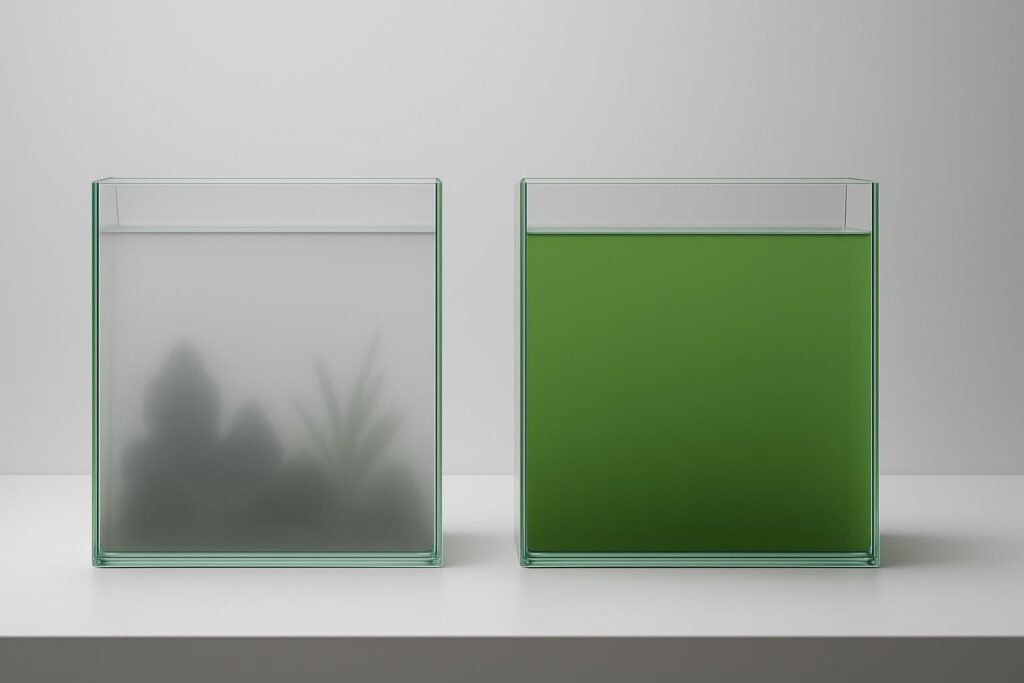
Bacterial bloom looks milky, gray, or foggy. The water appears cloudy but not tinted. You can still see objects, just through a haze.
Green water is tinted green. The whole tank has a uniform green cast. Objects fade into a green fog even a short distance away.
When they appear
Bacterial bloom often shows up in new tanks, after deep cleanings, after overfeeding, or after disturbing substrate. It can also follow a big change in filtration or after using medications that affect bacteria.
Green water often appears after strong light exposure, long photoperiods, direct sunlight on the tank, nutrient spikes from overfeeding, or when fish waste builds up faster than plants can use it.
Quick at-home checks
Flashlight test: in a dark room, shine a flashlight through the water. Green water shows a clear green beam. Bacterial bloom shows a white beam and suspended haze.
White cup test: scoop tank water into a white cup. If it looks green, you have algae. If it looks gray or cloudy without color, it is likely bacteria.
Timing clue: a sudden cloud within a day or two after a big cleaning or new-tank setup points to bacterial bloom. A slow shift to green during a week of heavy light points to algae.
Fixing a bacterial bloom
Immediate steps that work
Reduce feeding for a few days. Uneaten food fuels the bloom.
Increase aeration. Add an airstone or raise your filter outflow to boost surface agitation. Bacterial blooms consume oxygen at night.
Partial water changes of 20 to 30 percent daily for 2 to 3 days can help if ammonia or nitrite shows on a test kit. Match temperature and dechlorinate.
Do not scrub the filter media aggressively. Rinse gently in removed tank water. You want to preserve beneficial bacteria, not reset them.
What not to do
Avoid large deep cleanings that disturb all substrate at once.
Avoid turning the tank black for several days. Blackouts help algae, not a bacterial haze.
Avoid replacing all filter media at once. Stagger changes.
Product pick: Seachem Stability

Seachem Stability Fish Tank Stabilizer - For Freshwater and Marine Aquariums, 16.9 Fl Oz (Pack of 1)
View on AmazonWhy it helps: Adds fast-acting beneficial bacteria that outcompete the bloom and colonize filter media. Supports biofiltration after big cleanups or new-tank starts.
Best for: New tanks, post-medication recovery, after overcleaning, emergency stabilization during a bloom with detectable ammonia or nitrite.
How to use: Dose daily for the first week, then as needed after water changes or filter maintenance. Keep good aeration.
Potential downsides: If the root cause is ongoing overfeeding or a dead spot of waste, results will be slower until that issue is corrected.
Product pick: Tetra Whisper Air Pump

Tetra Whisper Air Pump for Aquariums Up to 40 Gallons, Non-UL
View on AmazonWhy it helps: Boosts oxygen when blooms are active and at night. Better oxygen helps fish and supports beneficial bacteria in the filter.
Best for: Tanks with minimal surface movement, heavy stocking, or warm water where oxygen runs low.
How to use: Add an airstone or sponge filter, set a steady stream of fine bubbles, and keep it running during the bloom.
Potential downsides: Can be audible if placed on a hard surface. Use silicone feet or a soft pad to dampen vibration.
Fixing green water
Immediate steps that work

HBTower Step Ladder, Folding Step Stool with Wide Anti-Slip Pedal
View on AmazonReduce light to 6 hours per day for a week. Remove direct sunlight with blinds or tank repositioning.
Perform two or three 30 to 50 percent water changes across 3 to 5 days to export nutrients that fuel algae. Re-dose dechlorinator each time.
Run fine mechanical media such as polishing pads to trap clumped algae if using a clarifier. Rinse pads daily until clear.
Consider a UV sterilizer for the fastest, most reliable clearing. It kills free-floating algae as water passes the UV chamber and typically clears tanks in a few days.
Longer-term control
Feed lightly and avoid letting food hit the substrate. Vacuum detritus each water change.
Plant fast growers such as hornwort or water sprite to consume excess nutrients.
Keep consistent maintenance: 25 to 40 percent weekly water changes on stocked tanks.
Product pick: AA Aquarium Green Killing Machine UV Sterilizer

660GPH Large Aquarium Filter, UV Sterilizer for Aquarium for 100-400 Gallon
View on AmazonWhy it helps: Targets free-floating algae directly in the water column. Results often show within 48 to 72 hours when flow and installation are correct.
Best for: Persistent green water, tanks near windows, high light setups, or when you want a near-guaranteed clear outcome.
How to use: Install in-tank per instructions, ensure the recommended turnover, and run continuously until water clears. Replace UV bulb per schedule.
Potential downsides: Does not fix the nutrient or light imbalance. Combine with better light control and feeding habits.
Product pick: API Accu-Clear Water Clarifier

API ACCU-CLEAR Freshwater Aquarium Water Clarifier 8-Ounce Bottle
View on AmazonWhy it helps: Flocculates tiny particles and free algae so your filter can trap them. Useful when you want a faster cosmetic clear while you correct root causes.
Best for: Mild to moderate green water, tanks with strong filtration and space for polishing pads.
How to use: Dose per instructions, add a fresh polishing pad, and rinse or replace media daily until clear.
Potential downsides: Overdosing can reduce oxygen. Maintain aeration and follow label directions.
Test and track what drives both problems
Both blooms relate to nutrient imbalances. Testing helps you see patterns and prevents repeat outbreaks.
Product pick: API Freshwater Master Test Kit
Why it helps: Measures ammonia, nitrite, nitrate, and pH. Ammonia and nitrite indicate unstable biofiltration that pairs with bacterial blooms. High nitrate suggests excess nutrients that can feed algae.
Best for: New tanks, after fish additions, after big cleanings, and during any cloudy event.
How to use: Test every other day during an issue, then weekly once stable. Log results to connect actions to outcomes.
Potential downsides: Does not measure phosphate. If algae persists, consider adding a phosphate test to complete the picture.
Prevention checklist
Feeding and stocking
Feed only what fish finish in under 30 seconds once or twice daily. Avoid overstocking. More fish means more waste and more fuel for blooms.
Filtration and flow
Use a filter rated for your tank volume and bioload. Maintain gentle but consistent flow to avoid dead zones where waste accumulates.
Maintenance rhythm
Perform 25 to 40 percent weekly water changes. Vacuum light debris each time. Rinse filter media in removed tank water. Stagger media replacement.
Light management
Set a timer for 6 to 8 hours of light. Block direct sunlight. Increase plant mass if you run brighter lights.
Simple decision guide
If the water is gray or milky
Suspect bacterial bloom. Test ammonia and nitrite. Reduce feeding. Increase aeration. Stabilize biofilter with a bottled bacteria product. Perform modest water changes if ammonia or nitrite is present.
If the water is green
Suspect free-floating algae. Shorten photoperiod. Remove sunlight. Do several large water changes. Use a UV sterilizer or a clarifier with polishing pads. Improve ongoing nutrient control with better feeding and plant growth.
Conclusion
Cloudy water does not have to be confusing. Bacterial bloom looks milky and links to biofilter instability. Green water looks tinted and links to excess light and nutrients. Identify the look, apply the right fix, and adjust habits so it does not return. With clear steps and a few reliable tools, most tanks clear within days and stay that way.
FAQ
Q: How can I quickly tell bacterial bloom from green water
A: Bacterial bloom looks gray or milky with no color tint, while green water has a clear green cast. Use a flashlight in a dark room; green water shows a green beam, while a bloom shows a white beam through haze.
Q: What triggers a bacterial bloom
A: Common triggers include new tank setups, deep cleanings that disturb substrate, overfeeding, big filtration changes, and events that unsettle beneficial bacteria.
Q: What clears green water the fastest
A: A UV sterilizer clears green water fast by killing free-floating algae as water passes the UV chamber. Combine it with shorter light periods and better nutrient control to prevent return.
Q: Should I blackout the tank for a bacterial bloom
A: No. Blackouts help with algae but not with bacterial haze. Focus on aeration, modest water changes if ammonia or nitrite are present, and stabilizing the biofilter.
Q: How much light should I run to prevent green water
A: Set a timer for about 6 hours per day while clearing green water, then stabilize at 6 to 8 hours with no direct sunlight on the tank.